
Как получить значения font-family из блочной темы в компонент?
Есть WordPress с любой установленной блочной темой по умолчанию. В его файле theme.json есть соответствующие настройки и параметры предоставленых шрифтов. Их можно корректно применять в стандарных Гутенберг элементах в админке поста.
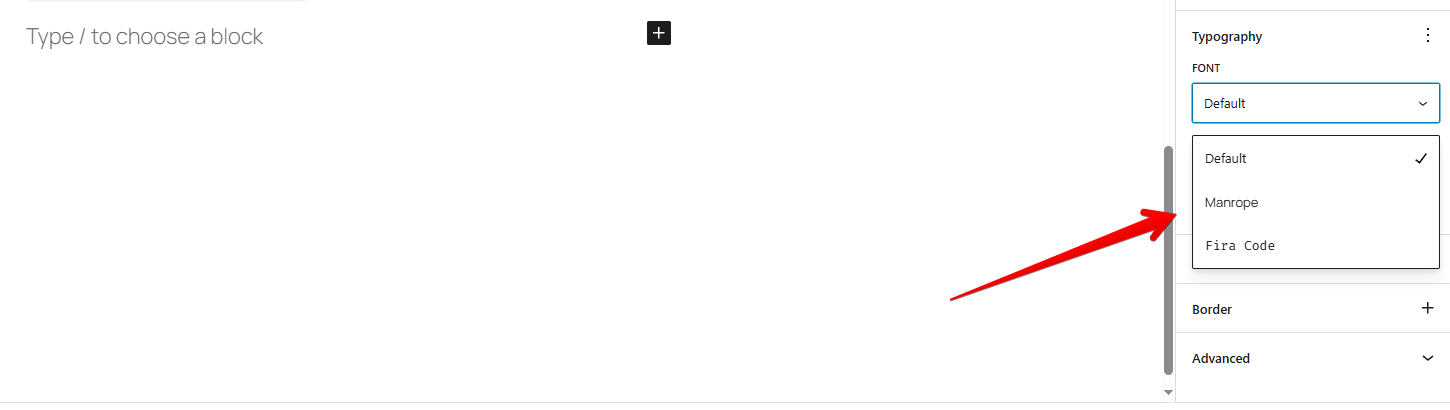
Вопрос - Как для кастомного компонента получить данный список параметров значения font-family ?
*В процессе поисков меня направили на документацию эксперементального компонента.
Но мне не удалось его нормально оживить. Вот мой код:
import { __experimentalFontFamilyControl as FontFamilyControl } from '@wordpress/block-editor';
import { __ } from '@wordpress/i18n';
import { useSelect } from '@wordpress/data';
import { useState, useEffect, useCallback } from '@wordpress/element';

const fontsFromStore = useSelect( ( select ) => {
		try {
			const bs = select( 'core/block-editor' );
			const es = select( 'core/editor' );
			const s1 = bs?.getSettings?.();
			const s2 = es?.getEditorSettings?.();
			const settings = s1 || s2 || {};

			// Список путей, где могут быть шрифты
			const candidates = [
				settings?.typography,
				settings?.__experimentalFeatures?.typography,
				settings?.settings?.typography,
				settings?.theme?.settings?.typography,
				settings?.fontFamilies,
			];

			let found = [];
			candidates.forEach( typ => {
				if ( ! typ ) return;
				if ( Array.isArray( typ ) ) {
					found = found.concat( typ );
					return;
				}
				if ( typ.fontFamilies ) {
					if ( Array.isArray( typ.fontFamilies ) ) found = found.concat( typ.fontFamilies );
					else if ( typeof typ.fontFamilies === 'object' ) {
						Object.values( typ.fontFamilies ).forEach( v => { if ( Array.isArray(v) ) found = found.concat(v); } );
					}
				}
				// если кто-то положил directly fontFamilies.theme
				if ( typ.fontFamilies?.theme && Array.isArray( typ.fontFamilies.theme ) ) {
					found = found.concat( typ.fontFamilies.theme );
				}
			} );

			found = ( found || [] ).filter( Boolean );

			// вернуть нормализованный массив
			return found.map( f => {
				const name = f.name || f.label || f.title || f.slug || f.fontFamily || '';
				const slug = f.slug || null;
				const family = f.fontFamily || null;
				const value = slug || family || name;
				return { name, slug, family, value };
			} );
		} catch ( e ) {
			// никогда не кидаем ошибку наружу — возвращаем пустой массив
			console.warn( 'fontsFromStore parse error', e );
			return [];
		}
	}, [] );

return (
		<>
...

{ Array.isArray(fontsFromStore) && fontsFromStore.length ? (
   // экспериментальный контрол доступен — ещё безопаснее: проверяем, что он вообще определён
						( typeof FontFamilyControl !== 'undefined' ? (
							<FontFamilyControl
								value={ titleFontFamily }
								onChange={ ( newVal ) => setAttributes({ titleFontFamily: newVal }) }
								__nextHasNoMarginBottom
								__next40pxDefaultSize
							/>
						) : (
							<SelectControl
								label={ __( 'Title font family', 'timeline-full-widget' ) }
								value={ titleFontFamily || '' }
								options={[
									{ label: __( 'Default', 'timeline-full-widget' ), value: '' },
									...fontsFromStore.map( f => ( { label: f.name || f.value, value: f.value } ) )
								]}
								onChange={ ( val ) => setAttributes({ titleFontFamily: val }) }
								__nextHasNoMarginBottom
								__next40pxDefaultSize
							/>
						) )
					) : (
						// пока шрифтов нет — просто показываем Select с Default
						<SelectControl
							label={ __( 'Title font family', 'timeline-full-widget' ) }
							value={ titleFontFamily || '' }
							options={[ { label: __( 'Default', 'timeline-full-widget' ), value: '' } ]}
							onChange={ ( val ) => setAttributes({ titleFontFamily: val }) }
							__nextHasNoMarginBottom
							__next40pxDefaultSize
						/>
					) }

</>
)