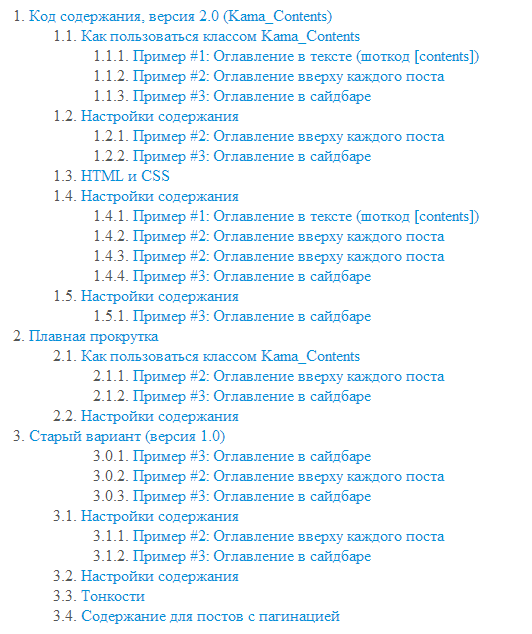
Не редко большие посты мы разделяем логическими подзаголовками. Порой пост несет в себе какую-то собранную информацию, разбитую на части. Для таких постов я предпочитаю создавать "оглавление" (содержание) — список ссылок с анкорами на подзаголовки в посте. Создавать такое оглавление - занятие до того муторное, что проще обойтись без него (за редким исключение, конечно).
Написал небольшой класс, который позволяет без шума и пыли, а также красиво и главное быстро создавать оглавления почти любой сложности. Для этого нужно использовать шоткод [contents], в том месте, где оно нам нужно. В начале этого поста вы видите то самое оглавление.
Кроме этого написанный мною класс позволяет создавать оглавление для любого текста, без использования шоткода в нем. А затем выводить это оглавление, например, в начале поста или в боковой колонке (сайдбаре).
"Оглавление" можно всячески настроить:
не показывать заголовок: "Содержание:" - [contents embed];
не показывать ссылки "К содержанию" в тексте - параметр to_menu;
настроить под себя CSS стили - параметр css;
изменить HTML теги по которым будет строиться оглавление. Можно указать любые теги не только H1, H2 ... но и strong, em и т.д. Или вообще, указать классы html тега, например: .foo, .bar. Пр: [contents h1 em .foo];
указать минимальное количество заголовков для того, чтобы оглавление выводилось - параметр min_found.
указать минимальную длину текста, чтобы оглавление выводилось - параметр min_length.
указать название шоткода, который будет использоваться в тексте для создания оглавления - параметр shortcode.
другие параметры, см. в коде класса Kama_Contents.
<?php
/** @noinspection PhpMultipleClassesDeclarationsInOneFile */
/** @noinspection RegExpRedundantEscape */
/**
 * Contents (table of contents) for large posts.
 *
 * @author  Kama
 * @see     http://wp-kama.com/2216
 *
 * @require PHP 7.4
 * @require WP 5.9
 *
 * @version 4.4.4
 */

namespace Kama\WP;

interface Kama_Contents_Interface {

	/** Creates an instance by specified parameters. */
	public function __construct( array $args = [] );

	/** Processes the text, turns the shortcode in it into a table of contents. */
	public function apply_shortcode( string $content ): string;

	/** Cuts out the kamaTOC shortcode from the content. */
	public function strip_shortcode( string $content ): string;

	/** Replaces the headings in the $content, creates and returns a table of contents. */
	public function make_contents( string &$content, string $params = '' ): string;

}

class Kama_Contents_Options {

	public string $margin           = '2em';
	public string $selectors        = 'h2 h3 h4';
	public string $to_menu          = 'contents ↑';  // '' - no link
	public string $title            = 'Table of Contents:';
	public string $js               = '';
	public int $min_found           = 1;
	public int $min_length          = 500;
	public string $page_url         = '';
	public string $shortcode        = 'contents';
	public string $spec             = '';   // Additional special chars to leave in anchors. Eg: `'.+$*=`.
	public string $anchor_type      = 'id'; // 'a' - `<a name="anchor"></a>` or 'id'
	public string $anchor_attr_name = 'id';
	public bool $markup             = false; // Enable microdata?
	public string $anchor_link      = '';
	public int $tomenu_simcount     = 800;
	public string $leave_tags       = 'all'; // all/1 (true) | '' (false) | string with tags like '<b><i><strong>'

	// shortcode additional params
	public array $as_table = [];
	public bool $embed     = false;

	private static array $default_args;

	public function __construct( array $args = [] ) {
		self::$default_args ??= get_object_vars( $this ); // set default args once

		foreach ( self::$default_args as $key => $def_val ) {
			$val = $args[ $key ] ?? $def_val;
			settype( $val, gettype( $def_val ) );
			$this->$key = $val;
		}
	}

	public static function get_default_args(): array {
		return self::$default_args ?: ( new self() )::$default_args; // ensure default args are set
	}

}

class Kama_Contents implements Kama_Contents_Interface {

	use Kama_Contents__Html;
	use Kama_Contents__Helpers;
	use Kama_Contents__Legacy;

	public Kama_Contents_Options $opt;

	/**
	 * Collects html (the contents).
	 *
	 * @var TOC_Elem[]
	 */
	protected array $toc_elems;

	/**
	 * Temporary data.
	 */
	private \stdClass $temp;

	/**
	 * @param array      $args {
	 *     Parameters.
	 *
	 *     @type string       $margin           Left margin for subsections in px|em|rem.
	 *     @type string|array $selectors        HTML tags used to build the table of contents: 'h2 h3 h4'.
	 *                                            The order defines the nesting level.
	 *                                            Can be a string/array: 'h2 h3 h4' or [ 'h2', 'h3', 'h4' ].
	 *                                            You can specify an attribute/class: 'h2 .class_name'.
	 *                                            To make different tags on the same level,
	 *                                            use |: 'h2|dt h3' or [ 'h2|dt', 'h3' ].
	 *     @type string       $to_menu          Link to return to the table of contents. '' - remove the link.
	 *     @type string       $title            Title. '' - remove the title.
	 *     @type string       $js               JS code (added after the HTML code).
	 *     @type int          $min_found        Minimum number of found tags required to display the TOC.
	 *     @type int          $min_length       Minimum text length (in characters) required to display the TOC.
	 *     @type string       $page_url         URL of the page for which the TOC is generated.
	 *                                            Useful if the TOC is displayed on another page...
	 *     @type string       $shortcode        Shortcode name. Default: 'contents'.
	 *     @type string       $spec             Keep symbols in anchors. For example: `'.+$*=`.
	 *     @type string       $anchor_type      Type of anchor to use: 'a' - `<a name="anchor"></a>` or 'id'.
	 *     @type string       $anchor_attr_name The tag attribute name whose value will be used
	 *                                            as the anchor (if the tag has this attribute). Set '' to disable this check...
	 *     @type bool         $markup           Enable microdata?
	 *     @type string       $anchor_link      Add a "sign" before a subheading with a link
	 *                                            to the current heading anchor. Specify '#', '&', or any symbol you like.
	 *     @type int          $tomenu_simcount  Minimum number of characters between TOC headings
	 *                                            to display the "back to contents" link.
	 *                                            Has no effect if the 'to_menu' parameter is disabled. For performance reasons,
	 *                                            Cyrillic characters are counted without encoding. Therefore, 800 Cyrillic characters -
	 *                                            is approximately 1600 characters in this parameter. 800 is recommended for Cyrillic sites.
	 *     @type string       $leave_tags       Whether to keep HTML tags in TOC items. Since version 4.3.4.
	 *                                            'all' or '1' (true) - keep all tags.
	 *                                            '' (false) - remove all tags.
	 *                                            `'<b><strong><var><code>'` - specify a string with tags to keep.
	 * }
	 */
	public function __construct( array $args = [] ) {
		$this->opt = new Kama_Contents_Options( $args );
	}

	/**
	 * Processes the text, turns the shortcode in it into a table of contents.
	 * Use shortcode [contents] or [[contents]] to show shortcode as is.
	 *
	 * @param string $content The text with shortcode.
	 *
	 * @return string Processed text with a table of contents, if it has a shotcode.
	 */
	public function apply_shortcode( string $content ): string {
		$shortcode = $this->opt->shortcode;

		if ( ! str_contains( $content, "[$shortcode" ) ) {
			return $content;
		}

		if ( ! preg_match( "/^(.*)(?<!\[)\[$shortcode([^\]]*)\](.*)$/su", $content, $mm ) ) {
			return $content;
		}

		// NOTE: sometimes wpautop() wraps shortcode with <p>...</p>
		$before = preg_replace( '~<p>$~', '', $mm[1] ); // remove wrapper <p>
		$params = $mm[2];
		$after  = preg_replace( '~^</p>~', '', $mm[3] ); // remove wrapper </p>

		$toc = $this->make_contents( $after, $params );

		return $before . $toc . $after;
	}

	/**
	 * Cuts out the kamaTOC shortcode from the content.
	 */
	public function strip_shortcode( string $content ): string {
		return preg_replace( '~(?<!\[)\[' . $this->opt->shortcode . '[^\]]*\]~', '', $content );
	}

	/**
	 * Replaces the headings in the past text (by ref), creates and returns a table of contents.
	 *
	 * @param string $content  The text from which you want to create a table of contents.
	 * @param string $params   Array of HTML tags to look for in the past text.
	 *                         "h2 .foo" - Specify: tag names "h2 h3" or names of CSS classes ".foo .foo2".
	 *                         "embed" - Add "embed" mark here to get `<ul>` tag only (without header and wrapper block).
	 *                         "as_table="Title|Desc" - Show as table. First sentence after header will be taken for description.
	 *                         It can be useful for use contents inside the text as a list.
	 *
	 * @return string Table of contents HTML.
	 */
	public function make_contents( string &$content, string $params = '' ): string {
		// text is too short
		if ( mb_strlen( strip_tags( $content ) ) < $this->opt->min_length ) {
			return '';
		}

		$this->temp = new \stdClass();

		$params_array = $this->parse_string_params( $params );
		$tags         = $this->split_params_and_tags( $params_array );
		$tags         = $this->get_actual_tags( $tags, $content );

		if ( ! $tags ) {
			unset( $this->temp );

			return '';
		}

		$this->temp->toc_page_url = $this->opt->page_url ?: home_url( parse_url( $_SERVER['REQUEST_URI'], PHP_URL_PATH ) );

		$this->collect_toc( $content, $tags );

		if ( count( $this->toc_elems ) < $this->opt->min_found ) {
			unset( $this->temp );

			return '';
		}

		$contents = $this->toc_html();

		unset( $this->temp );

		return $contents;
	}

	protected function parse_string_params( string $params ): array {
		$this->temp->original_string_params = $params;

		$extra_tags = [];

		// [contents as_table="Title|Desc" h2 h3]
		if ( preg_match( '/as_table="([^"]+)"/', $params, $mm ) ) {
			$extra_tags['as_table'] = explode( '|', $mm[1] ) + [ '', '' ];
			$params                 = str_replace( $mm[0], '', $params ); // cut
		}

		$params = array_map( 'trim', preg_split( '/[ ,|]+/', $params ) );

		$params += $extra_tags;

		return array_filter( $params );
	}

	protected function split_params_and_tags( array $params ): array {
		$tags = [];

		foreach ( $params as $key => $val ) {
			// extra tags
			if ( 'as_table' === $key ) {
				$this->opt->as_table = $val;
			} elseif ( 'embed' === $val || 'embed' === $key ) {
				$this->opt->embed = true;
			} elseif ( 'no_to_menu' === $val || 'no_to_menu' === $key ) {
				$this->opt->to_menu = '';
			} else {
				$tags[ $key ] = $val;
			}
		}

		if ( ! $tags ) {
			$tags = explode( ' ', $this->opt->selectors );
		}

		return $tags;
	}

	/**
	 * Remove tag if it's not exists in content (for performance).
	 */
	protected function get_actual_tags( array $tags, string $content ): array {

		foreach ( $tags as $key => $tag ) {

			$patt = ( $tag[0] === '.' )
				? 'class=[\'"][^\'"]*' . substr( $tag, 1 )
				: "<$tag";

			if ( ! preg_match( "/$patt/i", $content ) ) {
				unset( $tags[ $key ] );
			}
		}

		return $tags;
	}

	/**
	 * Collect TOC (all titles) from cpecified content.
	 * Replace HTML in specified content.
	 *
	 * @param string $content Changes by ref.
	 * @param array  $tags    HTML tags (selectors) to collect from content.
	 */
	protected function collect_toc( string &$content, array $tags ): void {

		$this->toc_elems = [];

		$this->_set_tags_levels_and_regex_patt( $tags );

		$patt_in = [];

		if ( $this->temp->tag_regex_patt ) {
			$tags_in   = implode( '|', $this->temp->tag_regex_patt );
			$patt_in[] = "(?:<($tags_in)([^>]*)>(.*?)<\/\\1>)";
		}

		if ( $this->temp->class_regex_patt ) {
			$class_in  = implode( '|', $this->temp->class_regex_patt );
			$patt_in[] = "(?:<([^ >]+) ([^>]*class=[\"'][^>]*($class_in)[^>]*[\"'][^>]*)>(.*?)<\/" . ( $patt_in ? '\4' : '\1' ) . '>)';
		}

		$patt_in = implode( '|', $patt_in );

		// collect and replace
		$this->temp->orig_content = $content;

		$new_content = (string) preg_replace_callback( "/$patt_in/is", [ $this, 'collect_toc_replace_callback' ], $content, -1 );

		if ( count( $this->toc_elems ) >= $this->opt->min_found ) {
			$content = $new_content;
		}
	}

	protected function _replace_parse_match( array $match ): array {

		$full_match = $match[0];

		// it's class selector in pattern
		if ( count( $match ) === 5 ) {
			[ $tag, $attrs, $level_tag, $tag_txt ] = array_slice( $match, 1 );
		}
		// it's tag selector
		elseif ( count( $match ) === 4 ) {
			[ $tag, $attrs, $tag_txt ] = array_slice( $match, 1 );

			$level_tag = $tag; // class name
		}
		// it's class selector
		else {
			[ $tag, $attrs, $level_tag, $tag_txt ] = array_slice( $match, 4 );
		}

		return [ $full_match, $tag, $attrs, $level_tag, $tag_txt ];
	}

	protected function _set_tags_levels_and_regex_patt( array $tags ): void {

		// group HTML classes & tags for regex patterns
		$tag_regex_patt = $class_regex_patt = $tags_levels = [];

		foreach ( $tags as $tag ) {
			// class
			if ( $tag[0] === '.' ) {
				$tag = substr( $tag, 1 );
				$_ln = &$class_regex_patt;
			}
			// html tag
			else {
				$_ln = &$tag_regex_patt;
			}

			$_ln[]         = $tag;
			$tags_levels[] = $tag;
		}

		$tags_levels = array_flip( $tags_levels );

		// fix levels if it's not start from zero
		if ( reset( $tags_levels ) !== 0 ) {
			while ( reset( $tags_levels ) !== 0 ) {
				$tags_levels = array_map(
					static function( $val ) {
						return $val - 1;
					},
					$tags_levels
				);
			}
		}

		// set equal level if tags specified with tag1|tag2
		$_prev_tag = '';
		foreach ( $tags_levels as $tag => $lvl ) {

			if ( $_prev_tag && false !== strpos( $this->temp->original_string_params, "$_prev_tag|$tag" ) ) {
				$tags_levels[ $tag ] = $_prev_lvl ?? 0;
			}

			$_prev_tag = $tag;
			$_prev_lvl = $lvl;
		}

		// set levels one by one, if they have been broken after the last operation
		$_prev_lvl = 0;
		foreach ( $tags_levels as & $lvl ) {

			// fix next lvl - it's wrong
			if ( ! in_array( $lvl, [ $_prev_lvl, $_prev_lvl + 1 ], true ) ) {

				$lvl = $_prev_lvl + 1;
			}

			$_prev_lvl = $lvl;
		}
		unset( $lvl );

		$this->temp->tags_levels      = $tags_levels;
		$this->temp->tag_regex_patt   = $tag_regex_patt;
		$this->temp->class_regex_patt = $class_regex_patt;
	}

	/**
	 * Callback function to replace and collect contents.
	 */
	protected function collect_toc_replace_callback( array $match ): string {

		[ $full_match, $tag, $attrs, $level_tag, $tag_text ] = $this->_replace_parse_match( $match );

		$this->temp->counter = ( $this->temp->counter ?? 0 ) + 1;

		$elem = new TOC_Elem(
			[
				'full_match' => $full_match,
				'tag'        => $tag,
				'anchor'     => $this->_toc_element_anchor( $tag_text, $attrs ),
				'text'       => $this->_strip_tags_in_elem_txt( $tag_text ),
				'level'      => $this->temp->tags_levels[ $level_tag ] ?? 0,
				'position'   => $this->temp->counter,
			]
		);

		$this->toc_elems[] = $elem;

		if ( $this->opt->anchor_link ) {
			$tag_text = '<a rel="nofollow" class="kamatoc-anchlink" href="#' . $elem->anchor . '">' . $this->opt->anchor_link . '</a> ' . $tag_text;
		}

		// anchor type: 'a' or 'id'
		if ( $this->opt->anchor_type === 'a' ) {
			$new_el = '<a class="kamatoc-anchor" name="' . $elem->anchor . '"></a>' . "\n<$tag $attrs>$tag_text</$tag>";
		} else {
			$new_el = "\n<$tag id=\"$elem->anchor\" $attrs>$tag_text</$tag>";
		}

		return $this->_to_menu_link_html( $elem ) . $new_el;
	}

	protected function _to_menu_link_html( TOC_Elem $elem ): string {

		if ( ! $this->opt->to_menu ) {
			return '';
		}

		// mb_strpos( $this->temp->orig_content, $full_match ) - в 150 раз медленнее!
		$el_strpos = strpos( $this->temp->orig_content, $elem->full_match );

		if ( empty( $this->temp->el_strpos ) ) {
			$prev_el_strpos        = 0;
			$this->temp->el_strpos = [ $el_strpos ];
		} else {
			$prev_el_strpos          = end( $this->temp->el_strpos );
			$this->temp->el_strpos[] = $el_strpos;
		}
		$simbols_count = $el_strpos - $prev_el_strpos;

		// Don't show to_menu link if simbols count beatween two elements is too small (< 300)
		if ( $simbols_count < $this->opt->tomenu_simcount ) {
			return '';
		}

		return sprintf(
			'<a rel="nofollow" class="kamatoc-gotop" href="%s">%s</a>',
			"{$this->opt->page_url}#tocmenu",
			$this->opt->to_menu
		);
	}

}

trait Kama_Contents__Html {

	protected function _toc_html(): string {
		$toc = '';
		foreach ( $this->toc_elems as $elem ) {
			$elem_html = $this->render_item_html( $elem );
			$toc      .= "\t$elem_html\n";
		}

		return $toc;
	}

	protected function toc_html(): string {
		$toc_html = $this->_toc_html();

		// table
		if ( $this->opt->as_table ) {
			$th1      = esc_html( $this->opt->as_table[0] );
			$th2      = esc_html( $this->opt->as_table[1] );
			$contents = <<<HTML
				<table id="tocmenu" class="kamatoc kamatoc_js" {ItemList}>
					{ItemName}
					<thead>
						<tr>
							<th>$th1</th>
							<th>$th2</th>
						</tr>
					</thead>
					<tbody>
						$toc_html
					</tbody>
				</table>
				HTML;
		}
		// list
		else {
			$add_wrapper        = $this->opt->title && ! $this->opt->embed;
			$contents_wrap_patt = '%s';

			if ( $add_wrapper ) {
				$contents_wrap_patt = <<<HTML
					<div class="kamatoc-wrap">
						<div class="kamatoc-wrap__title kamatoc_wrap_title_js">{$this->opt->title}</div>
						$contents_wrap_patt
					</div>
					HTML;
			}

			$contents = <<<HTML
				<ul id="tocmenu" class="kamatoc kamatoc_js" {ItemList}>
					{ItemName}
					$toc_html
				</ul>
				HTML;

			$contents = sprintf( $contents_wrap_patt, $contents );
		}

		$js_code = $this->opt->js
			? '<script>' . preg_replace( '/[\n\t ]+/', ' ', $this->opt->js ) . '</script>'
			: '';

		$contents = $this->replace_markup( $contents );

		/**
		 * Allow to change result contents string.
		 *
		 * @param string        $contents
		 * @param Kama_Contents $inst
		 */
		return apply_filters( 'kamatoc__contents', "$contents\n$js_code", $this );
	}

	protected function render_item_html( TOC_Elem $elem ): string {
		// table
		if ( $this->opt->as_table ) {
			// take first sentence
			$quoted_match = preg_quote( $elem->full_match, '/' );
			// preg_match( "/$quoted_match\s*<p>((?:.(?!<\/p>))+)/", $this->temp->orig_content, $mm )
			preg_match( "/$quoted_match\s*<p>(.+?)<\/p>/", $this->temp->orig_content, $mm );
			$tag_desc = $mm ? $mm[1] : '';

			$elem_html = '
				<tr>
					<td {ListElement}>
						<a rel="nofollow" href="' . "{$this->opt->page_url}#$elem->anchor" . '">' . $elem->text . '</a>
						{ListElement_item}
						{ListElement_name}
						{ListElement_pos}
					</td>
					<td>' . $tag_desc . '</td>
				</tr>';
		}
		// list (li)
		else {

			if ( $elem->level > 0 ) {
				$unit         = preg_replace( '/\d/', '', $this->opt->margin ) ?: 'px';
				$elem_classes = "kamatoc__sub kamatoc__sub_{$elem->level}";
				$elem_attr    = $this->opt->margin ? ' style="margin-left:' . ( $elem->level * (int) $this->opt->margin ) . $unit . ';"' : '';
			} else {
				$elem_classes = 'kamatoc__top';
				$elem_attr    = '';
			}

			$elem_html = '
				<li class="' . $elem_classes . '" ' . $elem_attr . '{ListElement}>
					<a rel="nofollow" href="' . "{$this->opt->page_url}#$elem->anchor" . '">' . $elem->text . '</a>
					{ListElement_item}
					{ListElement_name}
					{ListElement_pos}
				</li>';
		}

		$elem_html = $this->replace_elem_markup( $elem_html, $elem );

		/**
		 * Allow to change single TOC element HTML.
		 *
		 * @param string $elem_html
		 */
		return apply_filters( 'kamatoc__elem_html', $elem_html );
	}

	protected function replace_markup( $html ): string {
		$is = $this->opt->markup;

		$replace = [
			'{ItemList}' => $is ? ' itemscope itemtype="https://schema.org/ItemList"' : '',
			'{ItemName}' => $is ? '<meta itemprop="name" content="' . esc_attr( wp_strip_all_tags( $this->opt->title ) ) . '" />' : '',
		];

		return strtr( $html, $replace );
	}

	protected function replace_elem_markup( $html, TOC_Elem $elem ): string {
		$is = $this->opt->markup;

		$replace = [
			'{ListElement}'      => $is ? ' itemprop="itemListElement" itemscope itemtype="https://schema.org/ListItem"' : '',
			'{ListElement_item}' => $is ? ' <meta itemprop="item" content="' . esc_attr( "{$this->temp->toc_page_url}#$elem->anchor" ) . '" />' : '',
			'{ListElement_name}' => $is ? ' <meta itemprop="name" content="' . esc_attr( wp_strip_all_tags( $elem->text ) ) . '" />' : '',
			'{ListElement_pos}'  => $is ? ' <meta itemprop="position" content="' . (int) $elem->position . '" />' : '',
		];

		return strtr( $html, $replace );
	}

}

trait Kama_Contents__Helpers {

	protected function _toc_element_anchor( string $tag_txt, string $attrs ): string {
		// if tag contains id|name|... attribute it becomes anchor.
		if (
			$this->opt->anchor_attr_name
			&&
			preg_match( '/ *(' . preg_quote( $this->opt->anchor_attr_name, '/' ) . ')=([\'"])(.+?)\2 */i', $attrs, $match_anchor_attr )
		) {
			// delete 'id' or 'name' attr from attrs
			if ( in_array( $match_anchor_attr[1], [ 'id', 'name' ], true ) ) {
				$attrs = str_replace( $match_anchor_attr[0], '', $attrs );
			}

			$anchor = $this->_sanitaze_anchor( $match_anchor_attr[3] );
		} else {
			$anchor = $this->_sanitaze_anchor( $tag_txt );
		}

		return $anchor;
	}

	protected function _strip_tags_in_elem_txt( string $tag_txt ): string {
		// strip all tags
		if ( ! $this->opt->leave_tags ) {
			return strip_tags( $tag_txt );
		}

		// leave tags
		// $tag_txt не может содержать A, IMG теги - удалим если надо...
		if (
			'all' === $this->opt->leave_tags
			|| '1' === $this->opt->leave_tags // legasy when the var was bool type
		) {
			// remove A, IMG tags if they are in text
			// links and images in toc is bad idea

			if ( false !== strpos( $tag_txt, '</a>' ) ) {
				$tag_txt = preg_replace( '~<a[^>]+>|</a>~', '', $tag_txt );
			}
			if ( false !== strpos( $tag_txt, '<img' ) ) {
				$tag_txt = preg_replace( '~<img[^>]+>~', '', $tag_txt );
			}

			return $tag_txt;
		}

		// strip all tags, except specified (not-empty string passed)
		return strip_tags( $tag_txt, $this->opt->leave_tags );
	}

	/**
	 * Anchor transliteration.
	 */
	protected function _sanitaze_anchor( string $anch ): string {
		$anch = strip_tags( $anch );
		$anch = apply_filters( 'kamatoc__sanitaze_anchor_before', $anch, $this );
		$anch = html_entity_decode( $anch );

		// iso9
		$anch = strtr(
			$anch,
			[
				'А' => 'A',
				'Б' => 'B',
				'В' => 'V',
				'Г' => 'G',
				'Д' => 'D',
				'Е' => 'E',
				'Ё' => 'YO',
				'Ж' => 'ZH',
				'З' => 'Z',
				'И' => 'I',
				'Й' => 'J',
				'К' => 'K',
				'Л' => 'L',
				'М' => 'M',
				'Н' => 'N',
				'О' => 'O',
				'П' => 'P',
				'Р' => 'R',
				'С' => 'S',
				'Т' => 'T',
				'У' => 'U',
				'Ф' => 'F',
				'Х' => 'H',
				'Ц' => 'TS',
				'Ч' => 'CH',
				'Ш' => 'SH',
				'Щ' => 'SHH',
				'Ъ' => '',
				'Ы' => 'Y',
				'Ь' => '',
				'Э' => 'E',
				'Ю' => 'YU',
				'Я' => 'YA',
				// small
				'а' => 'a',
				'б' => 'b',
				'в' => 'v',
				'г' => 'g',
				'д' => 'd',
				'е' => 'e',
				'ё' => 'yo',
				'ж' => 'zh',
				'з' => 'z',
				'и' => 'i',
				'й' => 'j',
				'к' => 'k',
				'л' => 'l',
				'м' => 'm',
				'н' => 'n',
				'о' => 'o',
				'п' => 'p',
				'р' => 'r',
				'с' => 's',
				'т' => 't',
				'у' => 'u',
				'ф' => 'f',
				'х' => 'h',
				'ц' => 'ts',
				'ч' => 'ch',
				'ш' => 'sh',
				'щ' => 'shh',
				'ъ' => '',
				'ы' => 'y',
				'ь' => '',
				'э' => 'e',
				'ю' => 'yu',
				'я' => 'ya',
				// other
				'Ѓ' => 'G',
				'Ґ' => 'G',
				'Є' => 'YE',
				'Ѕ' => 'Z',
				'Ј' => 'J',
				'І' => 'I',
				'Ї' => 'YI',
				'Ќ' => 'K',
				'Љ' => 'L',
				'Њ' => 'N',
				'Ў' => 'U',
				'Џ' => 'DH',
				'ѓ' => 'g',
				'ґ' => 'g',
				'є' => 'ye',
				'ѕ' => 'z',
				'ј' => 'j',
				'і' => 'i',
				'ї' => 'yi',
				'ќ' => 'k',
				'љ' => 'l',
				'њ' => 'n',
				'ў' => 'u',
				'џ' => 'dh',
			]
		);

		$spec = preg_quote( $this->opt->spec, '/' );
		$anch = preg_replace( "/[^a-zA-Z0-9_$spec\-]+/", '-', $anch ); // все ненужное на '-'
		$anch = strtolower( trim( $anch, '-' ) );
		$anch = substr( $anch, 0, 70 ); // shorten

		$anch = apply_filters( 'kamatoc__sanitaze_anchor', $anch, $this );

		return $this->_unique_anchor( $anch );
	}

	/**
	 * Adds number at the end if this anchor already exists.
	 */
	protected function _unique_anchor( string $anch ): string {

		if ( ! isset( $this->temp->anchors ) ) {
			$this->temp->anchors = [];
		}

		// check and unique anchor
		if ( isset( $this->temp->anchors[ $anch ] ) ) {

			$lastnum = substr( $anch, -1 );
			$lastnum = is_numeric( $lastnum ) ? $lastnum + 1 : 2;
			$anch    = preg_replace( '/-\d$/', '', $anch );

			return $this->{ __FUNCTION__ }( "$anch-$lastnum" );
		}

		$this->temp->anchors[ $anch ] = 1;

		return $anch;
	}

}

trait Kama_Contents__Legacy {

	/**
	 * Creates an instance of Kama_Contents for later use.
	 */
	public static function init( array $args = [] ): Kama_Contents {
		static $inst = [];

		$args     = array_intersect_key( $args, Kama_Contents_Options::get_default_args() ); // leave allowed only
		$inst_key = md5( serialize( $args ) );

		if ( empty( $inst[ $inst_key ] ) ) {
			$inst[ $inst_key ] = new self( $args );
		}

		return $inst[ $inst_key ];
	}

	/**
	 * Alias of {@see apply_shortcode()}.
	 */
	public function shortcode( string $content ): string {
		return $this->apply_shortcode( $content );
	}

}

class TOC_Elem {

	/** @var string */
	public $full_match;

	/** @var string */
	public $tag;

	/** @var string */
	public $anchor;

	/** @var string */
	public $text;

	/** @var int */
	public $level;

	/** @var int */
	public $position;

	public function __construct( array $data ) {

		foreach ( $data as $key => $val ) {
			$this->$key = $val;
		}
	}

}
Как пользоваться классом Kama_Contents
Прежде всего нужно подключить код:
Создайте файл, например Kama_Contents.php, и скопируйте туда код. Подключите этот файл в файл темы functions.php:
require_once __DIR__ .'/Kama_Contents.php';
Используйте композер:
composer require doiftrue/wp-kama-contents
Теперь можно использовать класс. Для этого выбирайте подходящий код из примеров ниже и добавьте его в файл темы functions.php или куда вам удобно.
#1 Оглавление в тексте (шоткод [contents])
При написании поста используйте шоткод [contents] или [contents h3] или [contents h3 h5]. На месте шоткода появится Оглавление текста который следует после шоткода:
Разместите этот код рядом с основным и в начале каждого поста у вас будет выводится содержание, по указанным тегам array('h2','h3'), т.е. если в тексте будут найдены теги h2 или h3, то из них будет собрано содержание:
#3 Оглавление вверху каждого поста, после разделителя
Этот код будет вставлять оглавление в начале каждой записи. Но не в самом начале, а после первого параграфа. Номер параграфа (разделителя) и сам разделитель можно изменить в переменных: $_sep_num и $_sep соответственно.
// Вывод содержания вверху после указанного параграфа, автоматом для всех записей
add_filter( 'the_content', 'contents_at_top_after_nsep', 20 );

function contents_at_top_after_nsep( $text ){

	if( ! is_singular() ){
		return $text;
	}

	$params = (object) [
		'sep' => '</p>',   // разделитель в тексте
		'num' => 1,        // после какого по порядку разделителя вставлять оглавление?
		'pos' => 'after',  // before|after - до или после разделителя нужно вставлять оглавление
	];

	$toc = new \Kama\WP\Kama_Contents( [
		'min_length' => 500,
		'css'        => false,
		'markup'     => true,
		'selectors'  => [ 'h2', 'h3' ],
	] );

	// just do it!
	$ex_text = explode( $params->sep, $text, $params->num + 1 );

	// подходящий по порядку разделитель найден в тексте
	if( isset( $ex_text[ $params->num ] ) ){

		$contents = $toc->make_contents( $ex_text[ $params->num ] );

		if( 'after' === $params->pos ){
			$ex_text[ $params->num ] = $contents . $ex_text[ $params->num ];
		}
		else {
			$ex_text[ $params->num - 1 ] = $ex_text[ $params->num - 1 ] . $contents;
		}

		$text = implode( $params->sep, $ex_text );
	}
	// просто в верху текста
	else {
		$contents = $toc->make_contents( $text );

		$text = $contents . $text;
	}

	return $text;
}
Теперь например, чтобы вывести оглавление до первого <h2> заголовка, укажите параметры:
    $params = (object) [
		'pos' => 'before',  // before|after - до или после разделителя нужно вставлять оглавление
		'sep' => '<h2',    // разделитель в тексте
		'num' => 1,        // после какого по порядку разделителя вставлять оглавление?
	];
Обратите внимание что <h2 не закрывается - это потому что в нем могут быть аргументы...
#4 Оглавление в сайдбаре
Эти примеры похожи на второй - тут также используется метод make_contents(), а не apply_shortcode(), как в первом.
Вариант 1
Добавьте эту функцию рядом с классом и используйте там где нужно вывести оглавление. В функцию нужно передать объект поста (по умолчанию передается global $post) для которого нужно получить оглавление или можно передать сам текст для которого нужно вывести оглавление (текст нужно передавать в переменной, которая потом будет использована для вывода текста, именно эта переменная, потому что в ней по ссылке изменяется текст - к его заголовкам добавляются анкоры).
// для вывода оглавления
function get_kama_contents( & $post = false ){

	if( ! $post ) $post = $GLOBALS['post'];

	if( is_string( $post ) ){
		$post_content = & $post;
	}
	else {
		$post_content = & $post->post_content;
	}

	$toc = new \Kama\WP\Kama_Contents( [
		'selectors' => [ 'h2', 'h3' ],
		'min_found' => 1,
		'margin'    => 0,
		'to_menu'   => false,
		'title'     => false,
	] );

	$contents = $toc->make_contents( $post_content );

	// чтобы правильно работала the_content() которая работает на основе get_the_content()
	global $pages;
	if( $pages && count($pages) == 1 ){
		$pages[0] = $post_content;
	}
	else{
		// Тут нужна отдельная обработка...
	}

	return $contents;
}
Теперь выводим оглавление, например в сайдбаре:
echo get_kama_contents();
Заметка: get_kama_contents() нужно вызывать раньше чем выводиться контент. Если в HTML содержание нужно вывести ниже чем выводится контент, то вызовите функцию сохраните оглавление и выведите его ниже.
$contents = get_kama_contents();

// код код
the_content();

// выводим оглавление
echo $contents;
Вариант 2
Разместив этот код рядом с основным классом, оглавление можно вывести в любом месте шаблона, например в сайдбаре. Для этого используйте строку: echo $GLOBALS['kc_contents'];
// вывод содержания в сайдбаре
add_action( 'wp_head', 'sidebar_contents' );

function sidebar_contents(){
	global $post;

	if( ! is_singular() ){
		return;
	}

	$args = array();
	$args['selectors'] = [ 'h2', 'h3' ];
	//$args['margin'] = 50;
	//$args['to_menu'] = false;
	//$args['title'] = false;

	$toc = new \Kama\WP\Kama_Contents( $args );

	$GLOBALS['kc_contents'] = $toc->make_contents( $post->post_content );
}

// затем в сайдбаре выводим: echo $GLOBALS['kc_contents'];
#5 Разные экземпляры
Если нужно использовать несколько классов с разными параметрами. Например, чтобы обработать разные тексты. То разные экземпляры класса можно создать так:
// 1
// первый текст с шорткодом [toc]

$text1 = 'текст [toc] текст';

$kamatoc = new \Kama\WP\Kama_Contents( [
	'to_menu'   => 'к оглавлению ↑',
	'title'     => 'Оглавление:',
	'shortcode' => 'toc',
	//'page_url' => get_permalink(),
] );

echo $kamatoc->apply_shortcode( $text1 );

// 2
// второй текст с шорткодом [list]

$text2 = 'текст [list] текст';

$kamatoc2 = new \Kama\WP\Kama_Contents( [
	'to_menu'   = 'к списку ↑',
	'title'     = 'Навигация:',
	'shortcode' = 'list',
] );

echo $kamatoc2->apply_shortcode( $text2 );
Настройки Оглавления
Вы же заметили закомментированные строки в примерах? Это настройки. В экземпляр класса можно передавать аргументы (настройки):
margin(строка)
Отступ слева у подразделов в px|em|rem.
selectors(строка)
HTML теги по котором будет строиться оглавление: 'h2 h3 h4'. Порядок определяет уровень вложенности. Можно указать строку или массив: [ 'h2', 'h3', 'h4' ] или 'h2 h3 h4'. Можно указать атрибут class: 'h2 .class_name'. Если нужно чтобы разные теги были на одном уровне, указываем их через |: 'h2|dt h3' или [ 'h2|dt', 'h3' ].
to_menu(строка)
Ссылка на возврат к оглавлению. '' - убрать ссылку.
title(строка)
Заголовок. '' - убрать заголовок.
js(строка)
JS код (добавляется после HTML кода)
min_found(int)
Минимальное количество найденных тегов, чтобы оглавление выводилось.
min_length(int)
Минимальная длина (символов) текста, чтобы оглавление выводилось.
page_url(строка)
Ссылка на страницу для которой собирается оглавление. Если оглавление выводиться на другой странице...
shortcode(строка)
Название шоткода.
spec(строка)
Оставлять символы в анкорах. For example: '.+$*=.
anchor_type(строка)
Какой тип анкора использовать:
'a' - <a name="anchor"></a>
'id' - для заголовка будет указан атрибут id="___".
anchor_attr_name(строка)
Название атрибута тега из значения которого будет браться анкор (если этот атрибут есть у тега). Ставим '', чтобы отключить такую проверку...
markup(true|false)
Включить микроразметку?
anchor_link(строка)
Добавить 'знак' перед подзаголовком статьи со ссылкой на текущий анкор заголовка. Укажите '#', '&' или что вам нравится.
tomenu_simcount(int)
Минимальное количество символов между заголовками содержания, для которых нужно выводить ссылку "к содержанию". Не имеет смысла, если параметр 'to_menu' отключен. С целью производительности, кириллица считается без учета кодировки. Поэтому 800 символов кириллицы - это примерно 1600 символов в этом параметре. 800 - расчет для сайтов на кириллице.
leave_tags(true|false|строка)
Нужно ли оставлять HTML теги в элементах оглавления. С версии 4.3.4. Можно указать только какие теги нужно оставлять. Пр: '<b><strong><var><code>'.
HTML и CSS
Все содержание идет сплошными <li>, а для уровней указываются CSS классы и левый отступ - margin. С помощью классов можно настроить отображение как угодно...
Вот так выглядит HTML код, который генерирует Kama_Contents:
style="margin-left:40px;" добавляется автоматически на основе настройки $args['margin'] = 40;. Нет связи между числами в заголовках (h1, h2), уровни выставляются в зависимости от порядка указного в настройке: $args['def_tags'] = array('h2','h3','h4');. Т.е. если поменять на array('h3','h2','h4');, то h3 будет в содержании верхним уровнем - это нужно, чтобы указывать отличные от h* теги: strong, em.
Древовидная нумерация списка
Чтобы сделать древовидную нумерацию списка, как на картинке, установите для списка такие CSS стили:
В целом, можно ставить этот код на любой сайт где подключен jQuery и будет плавная прокрутка к якорям, а в частности, он хорошо сочетается с "содержанием" (см. пример, жмите там на ссылки). А это и js код:
// document.ready
jQuery(function($){

	// Прокрутка на все якоря (анкоры) (#) и на a[name]. v1.3
	$(document).on( 'click.smoothscroll', 'a[href*="#"]', function( e ){

		let hash    = this.hash
		let _hash   = hash.replace( /#/, '' )
		let theHref = $(this).attr('href').replace( /#.*/, '' )

		// у кнопки есть атрибут onclick значит у нее другая задача
		if( this.onclick )
			return

		// не текущая страница
		if( theHref && location.href.replace( /#.*/, '' ) !== theHref )
			return

		let $target = (_hash === '') ? $(document.body) : $( hash + ', a[name="'+ _hash +'"]').first()

		if( ! $target.length )
			return

		e.preventDefault()

		let scrollTo = $target.offset().top - 50

		$('html:first, body:first')
			.stop()
			.animate( { scrollTop: scrollTo }, 200, 'swing', function(){
				window.history.replaceState( null, document.title, hash )
			} )
	})

})
«Cкрыть/Показать» оглавление (jQuery код)
Вариант 1 ("как-в-википедии"):
/**
 * Показать/скрыть Содержание. Кнопка добавляется после Текста в заголовок - "Содержание: [скрыть]"
 * v 0.3
 */
// document.ready
jQuery(function($){

	let $title  = $('.kc__title')
	let showtxt = '[показать]'
	let hidetxt = '[скрыть]'
	let $but    = $('<span class="kc-show-hide" style="cursor:pointer;margin-left:.5em;font-size:80%;">'+ hidetxt +'</span>')

	$but.on( 'click', function(){

		let $the = $(this)
		let $cont = $the.parent().next('.contents')

		if( $the.text() === hidetxt ){
			$the.text( showtxt )
			$cont.slideUp()
		}
		else{
			$the.text( hidetxt )
			$cont.slideDown()
		}
	})

	$title.append( $but )
});
Вариант 2 (заголовок-кнопка):
/**
 * Показать/скрыть Содержание. Заголовок является кнопкой и к нему приписывается текст - "Содержание ▴"
 * v 1.0
 */
jQuery(document).ready(function($){

	let $title  = $('.kc__title').css({ cursor:'pointer' })
	let showico = ' ▾'
	let hideico = ' ▴'
	let collapsedKey = 'contents_collapse'
	let setIco = function( $that, type ){
		$that.text( type === 'hide' ? $that.text().replace( showico, hideico ) : $that.text().replace( hideico, showico ) )
	}

	$title.each(function(){

		let $the = $(this);

		$the.text( $the.text().replace(':','').trim() + hideico )

		$the.on( 'click', function(){

			let $cont = $the.next('.contents')

			if( $cont.is(':visible') ){
				$cont.slideUp(function(){
					$the.addClass('collapsed')
					setIco( $the, 'show' )
					window.localStorage.setItem( collapsedKey, '1' )
				})
			}
			else {
				$cont.slideDown(function(){
					$the.removeClass('collapsed')
					setIco( $the, 'hide' )
					window.localStorage.removeItem( collapsedKey )
				})
			}
		})

		// свернем/развернем на основе куков
		if( window.localStorage.getItem(collapsedKey) === '1' ){
			setIco( $the, 'show' )
			$the.next('.contents').hide()
		}
	})
});
Коды нужно добавить к имеющимся js скриптам. Код должен срабатывать после того как подключилась jQuery библиотека.
Плагины для создания оглавления
Есть не мало причин использовать готовые плагины, даже для тех кто может использовать материал из этой статьи. Потому что - это удобно! Вот плагины для создания такого же содержания:
Easy Table of Contents - удобный и функциональный плагин, который позволяет вам вставлять оглавление в ваши посты, страницы и пользовательские типы постов.
Table of Contents Plus - очень гибко настраиваемые плагин содержания в статьях. Также есть кнопка в виз. редакторе.
LuckyWP Table of Contents — генерирует содержание для записей, страниц и произвольных типов постов. Множество настроек, Gutenbeg-блок, кнопка в классическом редакторе. Поддерживает как ручное, так и автоматическое добавление содержания в посты.
Что добавить в скрипт "Содержание для больших постов"?
Что было сделано благодаря опросу:
- Добавить Schema разметку и оптимизировать код для поисковиков (30 голосов)
—
Заказать по очень недорогой цене комментарии в Инстаграм Вы можете на сайте Avi1.ru. При этом Вам не придется тратить свое время на поиск действительно надежного сервиса. Здесь Вы найдете все, что нужно: качественные услуги, приятные цены, гарантии и вежливое обслуживание.